Antfarm
OpenClaw FamilyBuild your agent team in OpenClaw with one command - Multi-agent orchestration and collaboration framework
Implemented Skills
README
Antfarm
<img src="https://raw.githubusercontent.com/snarktank/antfarm/main/landing/logo.jpeg" alt="Antfarm" width="80">Build your agent team in OpenClaw with one command.
You don't need to hire a dev team. You need to define one. Antfarm gives you a team of specialized AI agents — planner, developer, verifier, tester, reviewer — that work together in reliable, repeatable workflows. One install. Zero infrastructure.
Install
curl -fsSL https://raw.githubusercontent.com/snarktank/antfarm/v0.5.1/scripts/install.sh | bash
Or just tell your OpenClaw agent: "install github.com/snarktank/antfarm"
That's it. Run antfarm workflow list to see available workflows.
Not on npm. Antfarm is installed from GitHub, not the npm registry. There is an unrelated
antfarmpackage on npm — that's not this.
Requires Node.js >= 22. If
antfarmfails with anode:sqliteerror, make sure you're running real Node.js 22+, not Bun's node wrapper (see #54).
What You Get: Agent Team Workflows
feature-dev 7 agents
Drop in a feature request. Get back a tested PR. The planner decomposes your task into stories. Each story gets implemented, verified, and tested in isolation. Failures retry automatically. Nothing ships without a code review.
plan → setup → implement → verify → test → PR → review
security-audit 7 agents
Point it at a repo. Get back a security fix PR with regression tests. Scans for vulnerabilities, ranks by severity, patches each one, re-audits after all fixes are applied.
scan → prioritize → setup → fix → verify → test → PR
bug-fix 6 agents
Paste a bug report. Get back a fix with a regression test. Triager reproduces it, investigator finds root cause, fixer patches, verifier confirms. Zero babysitting.
triage → investigate → setup → fix → verify → PR
Why It Works
- Deterministic workflows — Same workflow, same steps, same order. Not "hopefully the agent remembers to test."
- Agents verify each other — The developer doesn't mark their own homework. A separate verifier checks every story against acceptance criteria.
- Fresh context, every step — Each agent gets a clean session. No context window bloat. No hallucinated state from 50 messages ago.
- Retry and escalate — Failed steps retry automatically. If retries exhaust, it escalates to you. Nothing fails silently.
How It Works
- Define — Agents and steps in YAML. Each agent gets a persona, workspace, and strict acceptance criteria. No ambiguity about who does what.
- Install — One command provisions everything: agent workspaces, cron polling, subagent permissions. No Docker, no queues, no external services.
- Run — Agents poll for work independently. Claim a step, do the work, pass context to the next agent. SQLite tracks state. Cron keeps it moving.
Minimal by design
YAML + SQLite + cron. That's it. No Redis, no Kafka, no container orchestrator. Antfarm is a TypeScript CLI with zero external dependencies. It runs wherever OpenClaw runs.
Built on the Ralph loop
<img src="https://raw.githubusercontent.com/snarktank/ralph/main/ralph.webp" alt="Ralph" width="100">Each agent runs in a fresh session with clean context. Memory persists through git history and progress files — the same autonomous loop pattern from Ralph, scaled to multi-agent workflows.
Quick Example
$ antfarm workflow install feature-dev
✓ Installed workflow: feature-dev

$ antfarm workflow run feature-dev "Add user authentication with OAuth"
Run: a1fdf573
Workflow: feature-dev
Status: running

$ antfarm workflow status "OAuth"
Run: a1fdf573
Workflow: feature-dev
Steps:
  [done   ] plan (planner)
  [done   ] setup (setup)
  [running] implement (developer)  Stories: 3/7 done
  [pending] verify (verifier)
  [pending] test (tester)
  [pending] pr (developer)
  [pending] review (reviewer)
Build Your Own
The bundled workflows are starting points. Define your own agents, steps, retry logic, and verification gates in plain YAML and Markdown. If you can write a prompt, you can build a workflow.
id: my-workflow
name: My Custom Workflow
agents:
  - id: researcher
    name: Researcher
    workspace:
      files:
        AGENTS.md: agents/researcher/AGENTS.md

steps:
  - id: research
    agent: researcher
    input: |
      Research {{task}} and report findings.
      Reply with STATUS: done and FINDINGS: ...
    expects: "STATUS: done"
Full guide: docs/creating-workflows.md
Security
You're installing agent teams that run code on your machine. We take that seriously.
- Curated repo only — Antfarm only installs workflows from the official snarktank/antfarm repository. No arbitrary remote sources.
- Reviewed for prompt injection — Every workflow is reviewed for prompt injection attacks and malicious agent files before merging.
- Community contributions welcome — Want to add a workflow? Submit a PR. All submissions go through careful security review before they ship.
- Transparent by default — Every workflow is plain YAML and Markdown. You can read exactly what each agent will do before you install it.
Dashboard
Monitor runs, track step progress, and view agent output in real time.
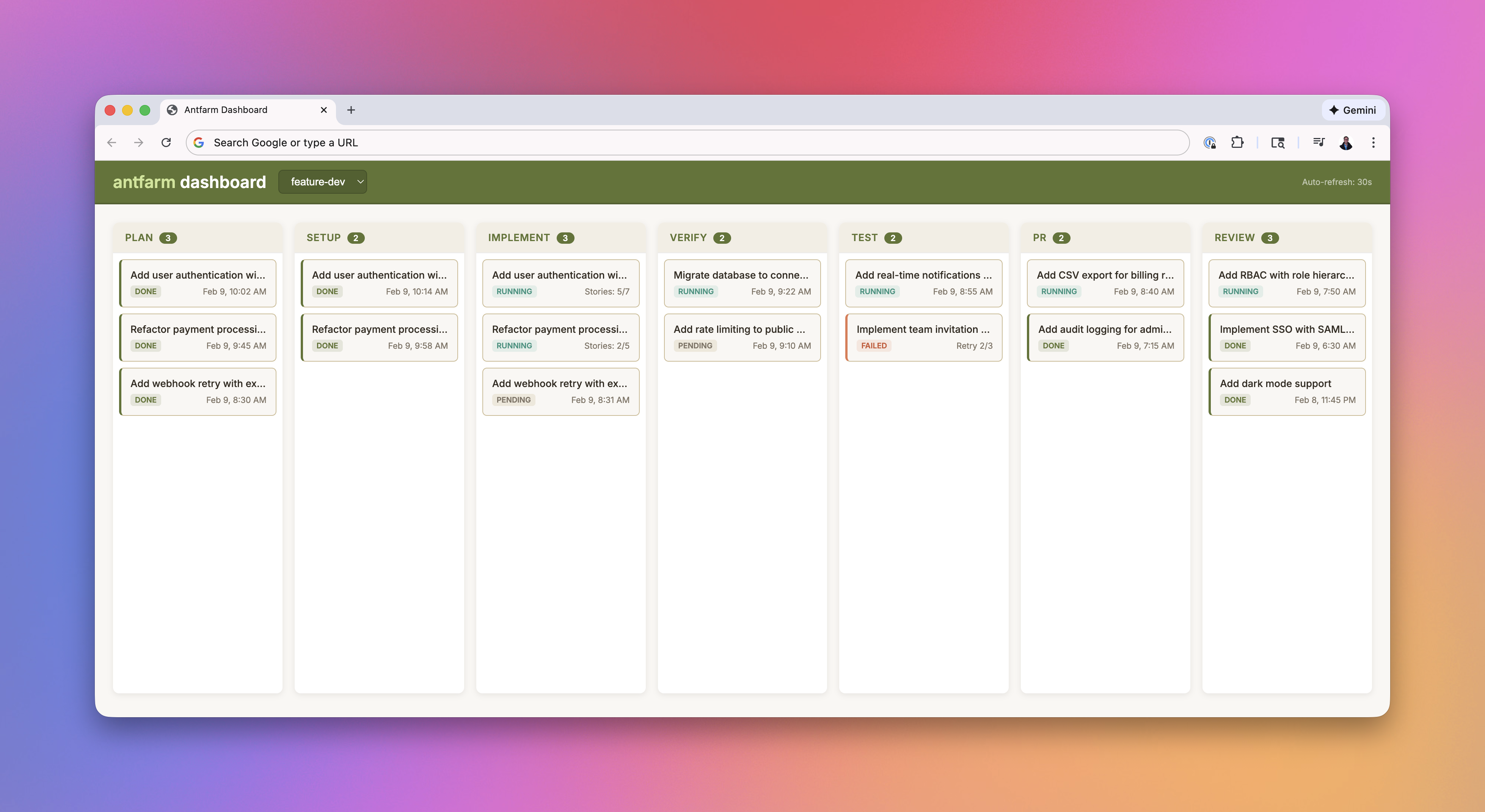
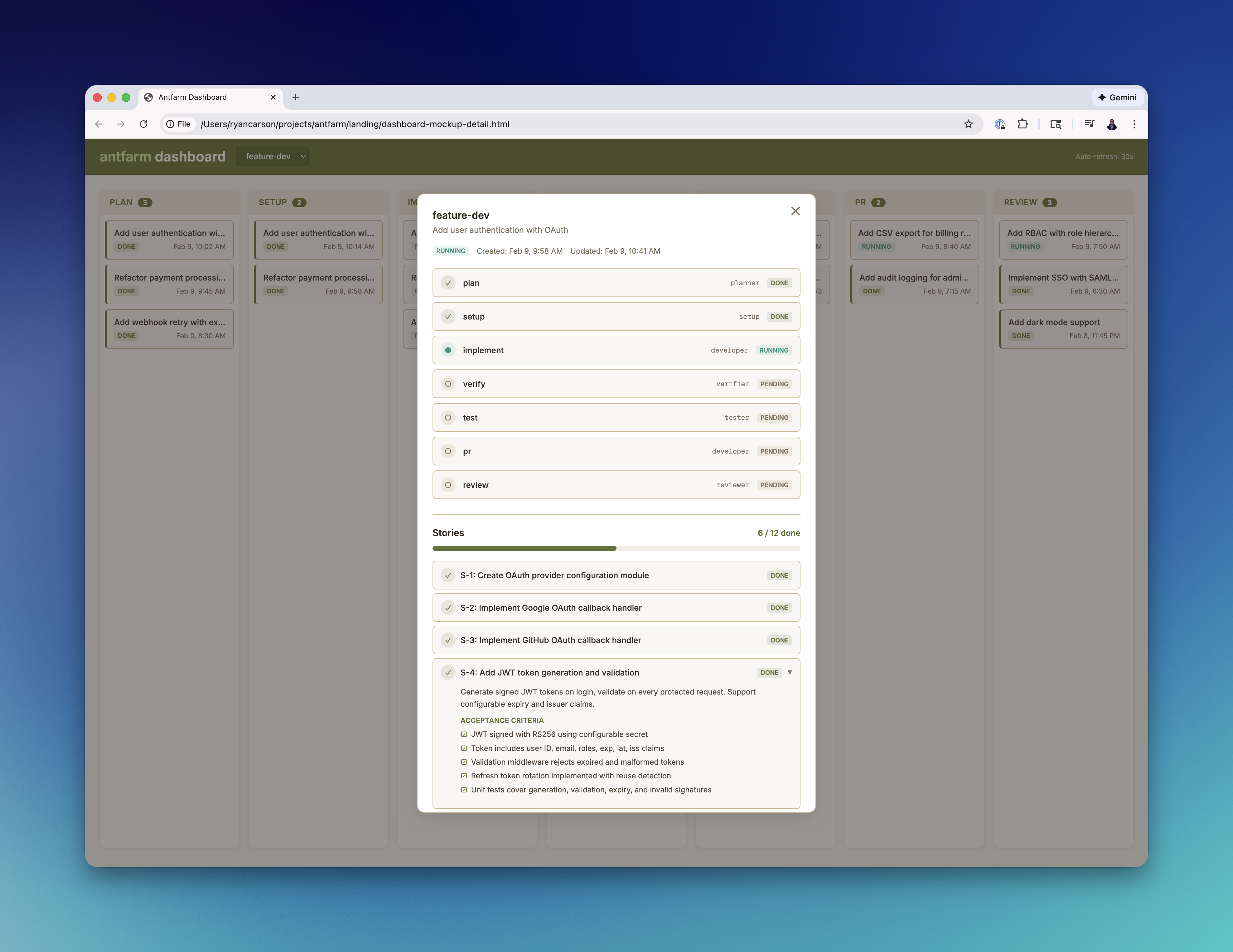
antfarm dashboard              # Start on port 3333
antfarm dashboard stop         # Stop
antfarm dashboard status       # Check status
Commands
Lifecycle
| Command | Description |
|---|---|
antfarm install | Install all bundled workflows |
antfarm uninstall [--force] | Full teardown (agents, crons, DB) |
Workflows
| Command | Description |
|---|---|
antfarm workflow run <id> <task> | Start a run |
antfarm workflow status <query> | Check run status |
antfarm workflow runs | List all runs |
antfarm workflow resume <run-id> | Resume a failed run |
antfarm workflow list | List available workflows |
antfarm workflow install <id> | Install a single workflow |
antfarm workflow uninstall <id> | Remove a single workflow |
Management
| Command | Description |
|---|---|
antfarm dashboard | Start the web dashboard |
antfarm logs [<lines>] | View recent log entries |
Requirements
- Node.js >= 22
- OpenClaw v2026.2.9+ running on the host
- Antfarm uses cron jobs for workflow orchestration. Older OpenClaw versions may not expose the cron tool via
/tools/invoke. Antfarm will automatically fall back to theopenclawCLI, but keeping OpenClaw up to date is recommended:npm update -g openclaw
- Antfarm uses cron jobs for workflow orchestration. Older OpenClaw versions may not expose the cron tool via
ghCLI for PR creation steps
License
<p align="center">Part of the <a href="https://docs.openclaw.ai">OpenClaw</a> ecosystem · Built by <a href="https://ryancarson.com">Ryan Carson</a></p>